Rolling out new outlet level dashboard
HI Team
We are rolling out the new dashboard tomorrow onwards starting from Ahmedabad. This change would be done at the outlet level only 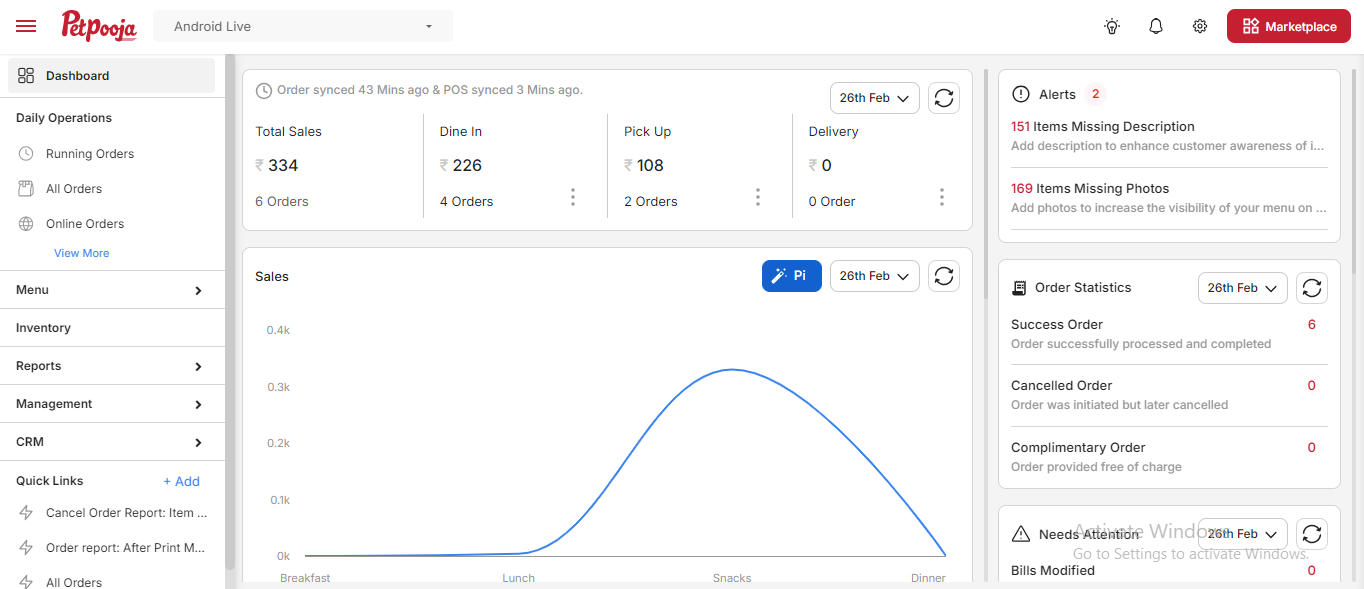
This is how the older dashboard looked like
The new dashboard has three sections :
Side Drawer
Sales Analytics
Information and Alerts section
Side Drawer
Sales Analytics
Information and Alerts section
Side Drawer
For this, the side drawer would remain open by default, we have also redesigned the placement as well as the header for the side panel as well
You can access the details of the changes done : https://docs.google.com/spreadsheets/d/1bsk1a6d8NXaybbuChjqggsT7Ye72fOY3-Zs2j23jWzM/edit?usp=sharing
The first section would be the ones which the user frequents the most, all those are under Daily Operations, The options for Running Orders, All Orders and Online Orders would be open by default and by clicking more they would get the addtional options
Similar has been done for Menu (collpasible by default) , Menu, Inventory, Reports, Management , CRM and the quick links
Sales Analytical Section
This section provides order and sales related analytics
This section is scrollable seperately and provide information which the merchant can get the trends on the sales(both offline as well as online), payment bifurcation and expenses
In the section of online orders, there is an option to provide more information in the dashboard as well, here it gives the performace of online channels as well as brand wise sales details
In Payment bifurcation, the user can click to get more details of the same
Similarly, in the expense , withdrawal and cash top up widget clicking on the graphs provide more information
Information and Alerts section
This section provides the information (Sales Statstics, Zomato Reviews, PoC) or where the user needs to take actio (Alerts and Needs Attention)
Related Articles
New Dashboard Widget: Important Insights
We are excited to announce the introduction of a New Dashboard Widget that brings important insights directly to your fingertips, enhancing your ability to monitor key aspects of your business. This feature is designed to highlight important ...Dashboard update : Outlet closing hours logs visible in the user dashboard
In the merchant dashboard, we have added a new logs where the merchant user would be able to check the closing hour change records. This logs would be able to display the closing hours changed through the dashboard as well as through PoS as well. The ...16-02-2024 : Owner's dashboard updates
Removing tables from Dashboard 1. We've developed a new functionality that allows users to delete the table in the outlet from the dashboard. Path : Owners dashboard → Menu management → Menu & Discounts → Tables/Areas → Tables A confirmation pop-up ...Release Note v109.0.3
This document will update you on some of the most amazing updates in Electron POS v109.0.3 POS updates 1. Print only last 4 digits of online order : Barcode To enhance the clarity on your bills and KOT prints, we've introduced a new configuration. ...Introducing Your New AI Agent
Introducing Your New AI Agent We are thrilled to announce the launch of our new AI Agent, a powerful tool designed to significantly enhance your experience and provide invaluable insights into your business operations directly within your dashboard. ...